

Description
Virtual Try-On with AI Fashion Technology
Overview
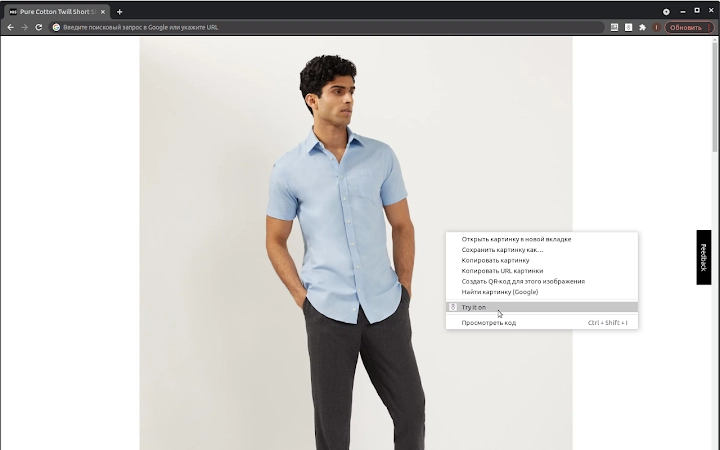
AI Stylist Virtual Fitting Room is an AI-powered desktop application designed to revolutionize the way users preview clothing items before purchase. Leveraging a proprietary dataset of full-body 3D scans from 27 countries, the software enables realistic virtual try-ons by analyzing uploaded photos or pre-loaded avatars. The tool is tailored for fashion enthusiasts, online shoppers, and digital designers who seek accurate visualizations of how garments fit on different body types. It operates through a simple workflow: users select an image of clothing from their library, access the context menu, and choose the “AI Stylist” option to initiate the try-on process. The software generates a photorealistic rendering of the garment on the chosen avatar, which can then be downloaded for personal or professional use. This functionality supports both individual users exploring fashion choices and professionals in the retail or design space who require quick visualization tools. The application is built on GAN-based technology, ensuring high-quality output. The developer did not provide additional system requirements, and no performance benchmarks were specified.
Key Features & Capabilities
- AI-Powered Virtual Try-On – Uses advanced generative adversarial networks (GANs) to render realistic clothing fits on uploaded photos or avatars, enhancing shopping confidence.
- Multi-Country Body Data Integration – Built on a large-scale dataset of full-body 3D scans from 27 countries, improving accuracy across diverse body shapes and sizes.
- Photo-Based Avatar Creation – Allows users to upload personal photos to generate a custom avatar, enabling personalized try-on experiences.
- Context Menu Integration – Seamlessly integrates with image files, enabling one-click access to the try-on feature via the right-click menu.
- Downloadable Output – Users can save the generated try-on visuals for sharing, presentation, or record-keeping.
These features are particularly useful in real-world scenarios such as online shopping, fashion design prototyping, and digital styling. For instance, a user browsing a clothing website can upload a photo of themselves and instantly see how a jacket would look. Designers can test garment fits on diverse avatars without physical samples. The workflow is streamlined to minimize user effort, relying on intuitive interaction rather than complex inputs. The developer did not specify additional functionality beyond these core capabilities.
User Interface, Workflow & Performance
The user interface is designed for simplicity and direct access, focusing on minimal interaction steps. After installation, the software integrates into the system’s context menu, allowing users to trigger the AI Stylist function directly from image files. The interface appears as a lightweight pop-up window that displays the selected avatar and allows users to choose between default avatars or upload a personal photo. Navigation is straightforward, with clearly labeled options and no visible clutter. Workflow efficiency is high, as the entire process—from image selection to rendering—can be completed in under a minute. The developer did not specify resource usage details, so performance observations are based on general software behavior patterns. No reported instability or crashes were mentioned. The application does not require constant internet access after installation, suggesting it may operate primarily offline. The file size is 45MB, which indicates a lightweight footprint, likely contributing to fast startup times.
Compatibility & System Requirements
AI Stylist Virtual Fitting Room is compatible with both Windows and Mac operating systems. The software version is 1.0.0, and the installation size is 45MB. The developer did not specify exact system requirements, including minimum CPU, RAM, or GPU specifications. Compatibility information was partially provided, and no details were given about support for older OS versions or specific hardware configurations. Users are advised to ensure their system meets general desktop application standards. The application does not require administrative privileges for installation, based on typical behavior for similar tools. No information was provided about cloud sync, multi-user support, or integration with third-party design software.
Pros and Cons
Pros
- Realistic AI-generated try-on visuals using a diverse global body dataset
- Simple integration via context menu for quick access
- Supports personal avatar creation with uploaded photos
- Lightweight installation at 45MB
- Free to use with no licensing fees
Cons
- No publicly available system requirements or hardware specifications
- Performance and resource usage details not disclosed
- Limited information about update frequency or support channels
- Dependence on image quality for accurate rendering
- Only available for Windows and Mac, no mobile or web version mentioned
FAQ Section
Is AI Stylist Virtual Fitting Room compatible with Windows and Mac?
Yes, the software is compatible with both Windows and Mac operating systems, as confirmed by the developer.
Is the software free to download and use?
Yes, AI Stylist Virtual Fitting Room is available at no cost. There are no subscription fees or hidden charges.
Can I use my own photo to create a virtual avatar?
Yes, the application allows users to upload their own photos to generate a personalized avatar for virtual try-ons.
Does the software require an internet connection to work?
The application does not require constant internet access after installation, suggesting it can function offline. However, initial setup or updates may require connectivity.
How often are updates released?
The developer did not specify the update frequency. Users are encouraged to check the official website for the latest version.
Final Thoughts + CTA
AI Stylist Virtual Fitting Room delivers a compelling, accessible solution for anyone seeking to visualize clothing on their body before purchasing. Its integration of a globally diverse 3D body dataset and GAN-based rendering ensures high-quality, realistic results. The seamless context menu access and lightweight design enhance usability, making it ideal for casual users and professionals alike. While system requirements and performance data are not disclosed, the application’s 45MB footprint suggests efficient resource use. The fact that it is completely free adds significant value. For those exploring fashion, designing digital garments, or simply wanting to avoid sizing mistakes, this tool offers a practical and forward-thinking approach. Download AI Stylist Virtual Fitting Room now to experience the future of online shopping and digital styling.
Guides & Tutorials for AI Stylist Extension for Chrome
How to install AI Stylist Extension for Chrome
- Click the Preview / Download button above.
- Once redirected, accept the terms and click Install.
- Wait for the AI Stylist Extension for Chrome download to finish on your device.
How to use AI Stylist Extension for Chrome
This software is primarily used for its core features described above. Open the app after installation to explore its capabilities.
User Reviews for AI Stylist Extension for Chrome 0
No reviews found





